IPTV lets Canadians watch television through an internet connection instead of relying entirely on cable, satellite, or an over-the-air antenna. Depending on the service, IPTV can include live television, sports, news, movies, series, catch-up programming, and video-on-demand content.
The technology itself is straightforward, but choosing and using an IPTV service requires more than installing an app. You need a stable internet connection, a compatible device, an appropriate IPTV player, and—most importantly—a provider that is transparent about its service, terms, support, and authority to distribute the content it offers.
This guide explains how IPTV works in Canada, what equipment and internet speed you need, how to evaluate a provider, what legal considerations apply, and how to avoid common setup and streaming problems.
IPTV in Canada: Quick Answer
| Question | Quick answer |
|---|---|
| What is IPTV? | Television delivered through an Internet Protocol network instead of traditional cable, satellite, or antenna broadcasting |
| Best for | Viewers who want flexible, internet-based access across multiple compatible devices |
| Setup difficulty | Beginner to moderate |
| Typical setup time | Approximately 10–30 minutes once account details are available |
| Compatible devices | Smart TVs, Fire TV devices, Android TV and Google TV devices, Apple TV, smartphones, tablets, computers, and compatible streaming boxes |
| Practical internet target | Around 10 Mbps per HD stream and 25 Mbps or more per 4K stream, with additional capacity for other household activity |
| Common connection methods | Ethernet, 5 GHz Wi-Fi, Wi-Fi 6, and compatible mesh networks |
| Common IPTV formats | Provider applications, M3U playlists, portal connections, and Xtream Codes-compatible logins |
| Main benefits | Device flexibility, live and on-demand content, customizable viewing, and no traditional satellite installation |
| Main limitations | Dependence on internet quality, provider reliability, device compatibility, and content rights |
| Is IPTV legal in Canada? | IPTV technology is legal. The legality of a particular service depends on whether it has the rights or authorization to distribute its content |
What Is IPTV?
IPTV stands for Internet Protocol Television. It is a system for transmitting television programming through an IP network—the same general technology used to deliver websites, email, video calls, and other internet services.
The Canadian Radio-television and Telecommunications Commission describes IPTV as digital television channels delivered through a high-speed internet connection.
With traditional television, programming reaches the viewer through a dedicated distribution method:
- Cable television uses a cable network.
- Satellite television uses signals transmitted from satellites.
- Over-the-air television uses local broadcast towers and an antenna.
- IPTV uses an internet or managed IP connection.
From the viewer’s perspective, IPTV can still resemble regular television. You open a channel guide, choose a station, watch a live program, or select a movie from a library. The main difference is how the content travels to your screen.
IPTV Is a Technology, Not a Specific Company
The word “IPTV” does not describe one provider or one type of subscription. It describes the delivery technology.
A large Canadian telecommunications company may operate a managed IPTV service through its own network and set-top box. A broadcaster may offer live channels through an internet application. Another provider may deliver a subscription through a compatible IPTV player.
These services can differ significantly in:
- Content rights
- Channel availability
- Streaming quality
- Reliability
- Applications
- Customer support
- Contract terms
- Geographic availability
- Consumer protections
For that reason, users should evaluate the specific service rather than assuming all IPTV subscriptions work in the same way.
How Does IPTV Work?
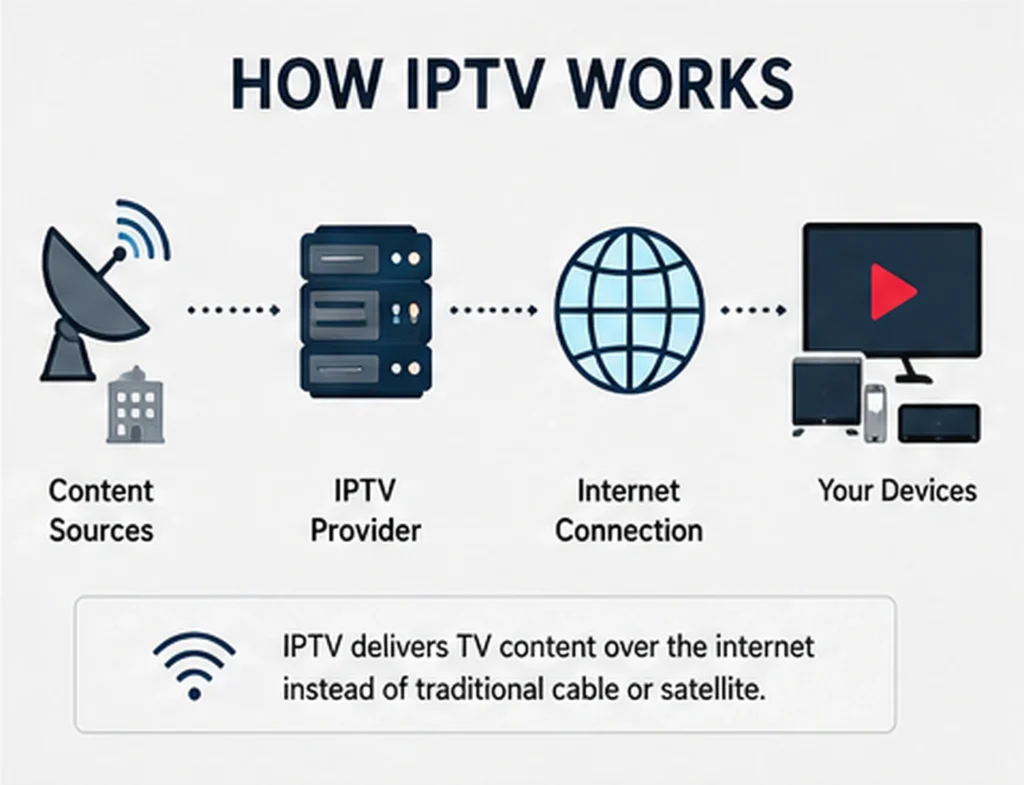
An IPTV system generally involves four main components:
- The content source
- The provider’s delivery platform
- Your internet connection
- Your device and player
1. The Content Source
The original content may come from television networks, studios, sports organizations, production companies, or other rights holders.
An authorized provider needs the appropriate agreements or permissions to distribute that programming to its customers.
2. The IPTV Platform
The provider prepares the channels or on-demand programs for internet delivery. This can involve:
- Receiving the original video feed
- Encoding or compressing the video
- Organizing channels and categories
- Creating an electronic program guide
- Managing user accounts
- Delivering streams through servers or content delivery networks
The quality of this infrastructure affects how quickly channels open, how consistently they play, and how well the service performs during busy viewing periods.
3. Your Internet Connection
When you choose a channel or program, your device requests the stream through the internet. The provider sends the video in small packets of data, and your player continuously buffers and displays those packets.
A stable connection matters more than a high number on an internet plan. A connection that repeatedly drops from 100 Mbps to 2 Mbps can perform worse than a consistent 30 Mbps connection.
Latency, Wi-Fi interference, congestion, router quality, and the distance between your device and router can all affect playback.
4. Your Device and IPTV Player
The player receives the stream and displays it on your television, phone, tablet, or computer.
Some providers have their own application. Others provide account details that work with a compatible third-party player. The player may also organize:
- Live channels
- Favourite channels
- Movies and series
- Program schedules
- Catch-up content
- Subtitles
- Audio tracks
- Parental controls
The player is only the interface. It does not normally provide television channels by itself.
IPTV, Internet TV, and OTT Streaming: What Is the Difference?
These terms are frequently used interchangeably, but there are useful distinctions.
Managed IPTV
Managed IPTV is commonly provided through a telecommunications company’s controlled network. The provider may supply a set-top box and combine television with home internet and phone services.
Because the provider manages more of the delivery path, it may be able to control quality and network traffic more closely.
Internet-Based IPTV
Internet-based IPTV operates over a regular broadband connection. Users may access the service through an app, playlist, portal, or compatible media player.
The experience depends on both the provider’s infrastructure and the user’s internet connection.
OTT Streaming
OTT means over the top. An OTT platform delivers video directly over the public internet without requiring a traditional cable or satellite package.
On-demand movie platforms, broadcaster applications, and some live-TV streaming services are examples of OTT delivery.
The Practical Difference for Viewers
The technical definitions matter less than the following questions:
- Does the service have the content you want?
- Is the content offered with the necessary rights?
- Does it work on your device?
- Is the picture quality consistent?
- Are the price and renewal terms clear?
- Can you obtain support when something goes wrong?
What Can You Watch With IPTV?
Available content depends entirely on the provider and subscription.
An IPTV service may include some combination of the following.
Live Television
Live television plays according to a broadcast schedule. Common categories include:
- News
- Sports
- Entertainment
- Documentaries
- Children’s programming
- Lifestyle channels
- International channels
- French-language and English-language channels
Video on Demand
Video on demand, usually shortened to VOD, allows viewers to choose a movie, episode, or other program without waiting for a scheduled broadcast.
The size of a VOD library is less important than its organization, playback reliability, audio options, subtitle support, and update frequency.
Catch-Up Television
Catch-up allows viewers to watch selected programs after their original broadcast.
Availability varies by channel. One provider may keep programs for 24 hours, while another may offer several days of catch-up. Not every channel necessarily supports the feature.
Electronic Program Guide
An electronic program guide, or EPG, displays information such as:
- Current programs
- Upcoming programs
- Start and end times
- Episode titles
- Program descriptions
An accurate guide makes an IPTV service much easier to navigate. However, EPG data can occasionally be missing, delayed, or assigned to the wrong channel.
Multi-Screen Viewing
A multi-screen subscription allows more than one stream to play simultaneously.
This is not the same as installing an app on multiple devices. Some subscriptions can be installed on several devices but permit only one active stream at a time.
Always check:
- The number of simultaneous connections
- Whether all screens must use the same home network
- Whether mobile use is permitted
- How much additional bandwidth each stream requires
Is IPTV Legal in Canada?
IPTV technology is legal in Canada. Canadian telecommunications companies, broadcasters, and online platforms use internet-based technology to deliver authorized television and video services.
The legal issue is not whether a service uses IPTV. The issue is whether the service has permission to distribute the programming it provides.
Canada’s Copyright Act gives copyright owners rights related to reproducing and communicating protected works. Canadian copyright guidance also explains that copyright applies to creative works, performances, sound recordings, and communication signals.
A service that distributes channels, movies, sports, or other protected content without the appropriate rights may be operating unlawfully, even though the underlying IPTV technology is legitimate.
How to Evaluate the Legitimacy of an IPTV Service
Consumers rarely have access to every commercial agreement between a provider and a rights holder. However, several checks can help you make a more informed decision.
Look for:
- A clearly identified business or service operator
- Accessible terms and conditions
- A privacy policy
- Transparent subscription and renewal terms
- A clear cancellation or refund process
- Secure payment methods
- Realistic descriptions of available content
- Working customer support
- Information about geographic restrictions
- Clear limits on simultaneous connections
- No instructions to hide payments or misrepresent transactions
Exercise caution when a provider:
- Claims to offer every premium channel and streaming platform in the world for an implausibly low price
- Refuses to explain its terms
- Changes domains or payment accounts repeatedly without explanation
- Accepts only difficult-to-reverse payment methods
- Pressures you to purchase a long subscription immediately
- Has no identifiable support channel
- Uses copied branding from established broadcasters
- Promises that a VPN makes any service legal
Does a VPN Make IPTV Legal?
No. A virtual private network can encrypt traffic between your device and the VPN server, but it does not give a provider content-distribution rights.
A VPN may be used for privacy or network-security purposes. However, it does not change the copyright status of a stream, and its use may be restricted by the terms of certain streaming platforms.
Canadian Consumer Protections
Many Canadian subscribers to qualifying television services are protected by the CRTC’s Television Service Provider Code. The code addresses areas such as understandable agreements, service changes, cancellation, and consumer rights.
The Commission for Complaints for Telecom-television Services provides free complaint-resolution services for Canadian phone, internet, and television consumers when an eligible provider participates in its system.
These protections do not automatically apply to every website or online IPTV seller. Before purchasing, check whether the provider is an identifiable business and whether a recognized complaint process is available.
This section provides general information and is not legal advice.
What Internet Speed Do You Need for IPTV?
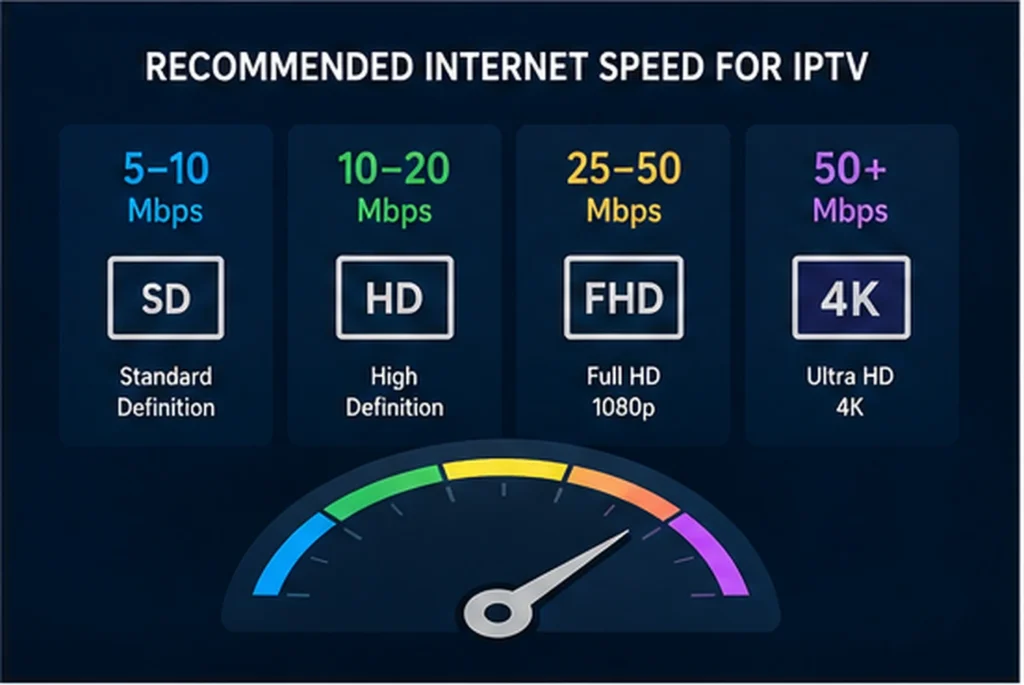
There is no single speed requirement for every IPTV service. The required bandwidth depends on:
- Video resolution
- Video compression
- Frame rate
- Number of simultaneous streams
- Other household internet activity
- Wi-Fi conditions
- Provider encoding quality
Major streaming platforms provide useful reference points. Netflix recommends at least 5 Mbps for Full HD and 15 Mbps for 4K, while YouTube lists approximately 5 Mbps for 1080p and 20 Mbps for 4K playback.
Those numbers are playback minimums under favourable conditions. For everyday IPTV use, additional capacity helps absorb speed fluctuations and other household activity.
| Viewing situation | Practical connection target |
|---|---|
| One SD stream | 5 Mbps or more |
| One HD stream | 10 Mbps or more |
| One Full HD stream | 10–15 Mbps or more |
| One 4K stream | 25 Mbps or more |
| Two simultaneous HD streams | 25–40 Mbps or more |
| Several streams plus gaming or downloads | 50–100 Mbps or more |
These are practical targets rather than guarantees. A poorly configured 500 Mbps connection can still buffer, while a stable 50 Mbps connection may handle several streams without difficulty.
Test the Speed at the Streaming Device
Do not rely only on the speed shown in your internet plan.
Run a speed test:
- On the device you use for IPTV
- In the room where you normally watch
- During evening viewing hours
- With other household devices connected
- More than once
The speed reaching a television can be much lower than the speed reaching a phone beside the router.
Speed Is Not the Only Factor
Streaming quality also depends on:
- Latency: How long data takes to travel between your device and a server
- Jitter: Variation in delivery timing
- Packet loss: Missing data packets
- Wi-Fi interference: Competition from nearby networks and household devices
- Network congestion: Heavy usage on your home network or internet provider
- Server performance: The IPTV provider’s available capacity
A regular speed test may look normal even when packet loss or unstable Wi-Fi causes freezing.
How Much Data Does IPTV Use?
Data usage varies by compression, resolution, and frame rate.
As a general reference, Netflix states that streaming can use up to approximately:
- 1 GB per hour in standard definition
- 3 GB per hour in high definition
- 7 GB per hour in 4K
Actual IPTV usage may be lower or higher depending on the stream.
Households with limited monthly data should monitor usage carefully. Two televisions streaming several hours each day can consume a substantial amount of data.
Wi-Fi or Ethernet: Which Is Better for IPTV?
Ethernet
A wired Ethernet connection is usually the most reliable choice for a stationary television or streaming device.
Advantages include:
- Lower interference
- More consistent speeds
- Lower latency
- Fewer signal drops
- Better performance during busy periods
Use Ethernet when your router and streaming device are close enough for practical cabling.
Wi-Fi
Modern Wi-Fi can work very well when properly configured.
For better results:
- Use the 5 GHz or 6 GHz band when the device is close to the router
- Use 2.4 GHz when longer range is more important than maximum speed
- Keep the router away from thick walls, metal cabinets, and enclosed furniture
- Avoid placing the router on the floor
- Update router firmware
- Use a mesh system for larger homes
- Connect high-priority streaming devices to the nearest access point
A strong Wi-Fi symbol does not always mean the connection is free from interference.
Which Devices Work With IPTV?
IPTV can work on many devices, but compatibility depends on the application and provider.
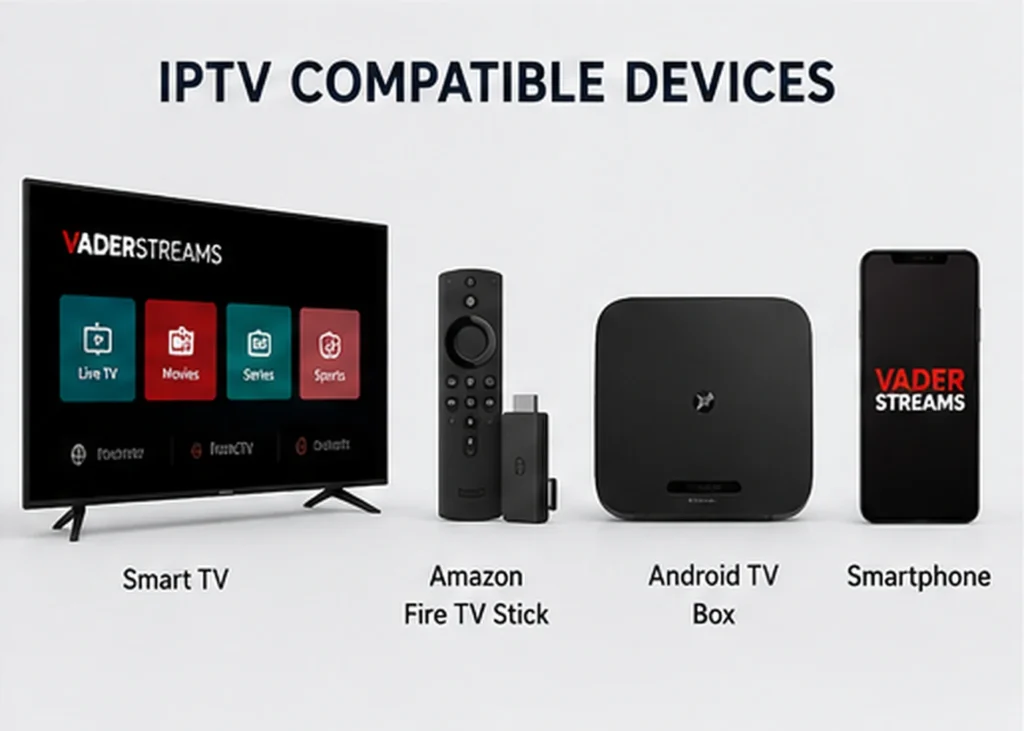
Smart TVs
Many Samsung, LG, Android TV, Google TV, Roku, and other smart televisions support streaming applications.
Advantages:
- No additional box may be required
- Simple remote-control experience
- Fewer cables
Possible limitations:
- Older televisions may have limited memory
- Some app stores do not carry every IPTV player
- Operating systems may stop receiving updates
- Built-in processors may feel slow with large playlists
Amazon Fire TV Devices
Fire TV devices are widely used because they are compact, relatively easy to operate, and support many streaming applications.
Performance depends on the specific model. Newer devices generally offer better processing, Wi-Fi, and video-codec support.
Android TV and Google TV
Android TV and Google TV devices offer broad application compatibility and flexible settings.
Choose a certified, reputable device rather than an unknown box with outdated software or pre-installed applications from unverifiable sources.
Apple TV
Apple TV offers smooth performance and a polished interface. IPTV support depends on whether a compatible application is available in the App Store.
Smartphones and Tablets
IPTV can work on Android phones, Android tablets, iPhones, and iPads.
Mobile viewing is useful when travelling, but users should consider:
- Mobile-data consumption
- Screen size
- Battery usage
- Geographic restrictions
- Whether the subscription permits use outside the home
Windows and Mac Computers
Computers can access IPTV through:
- A provider’s web player
- A desktop application
- A compatible media player
- A browser-based portal
Browser playback may not support every codec, subtitle format, or advanced feature.
IPTV Players, M3U Playlists, Xtream Codes, and EPGs
These terms often confuse new users.
What Is an IPTV Player?
An IPTV player is the application used to display and organize the service.
A player may provide:
- Channel categories
- Search
- Favourites
- EPG integration
- Recently watched content
- Subtitle controls
- Audio-track selection
- Parental controls
- Multiple profiles
Downloading a player does not usually include a content subscription.
What Is an M3U Playlist?
An M3U playlist is a text-based file or URL containing media entries. IPTV providers may use it to deliver channel and content information to compatible applications.
M3U is flexible and widely supported, but large playlists can take longer to load on low-powered devices.
What Are Xtream Codes-Compatible Details?
Some providers supply a server address, username, and password that can be entered into a compatible player.
This login method can organize live channels, movies, series, and EPG information more neatly than a basic playlist.
The term describes a connection format used by compatible players. It does not establish whether the content itself is authorized.
What Is an EPG?
An EPG provides television schedule information.
A good EPG should:
- Match the correct channels
- Display the correct time zone
- Update regularly
- Include useful program titles
- Load without slowing the device
If program times are shifted, check the device time zone and EPG offset settings before assuming the guide is broken.
How to Set Up IPTV
The exact process depends on your device, application, and provider, but the general steps are similar.
Step 1: Confirm Your Device Compatibility
Before buying a subscription, check:
- Your television or streaming-device model
- The operating-system version
- Available storage
- App-store access
- Supported video formats
- Whether Ethernet is available
Step 2: Check Your Internet Connection
Run a speed test near the streaming device.
For a Full HD stream, aim for a stable connection with enough unused capacity for other devices. For 4K or multiple screens, allow additional bandwidth.
Step 3: Choose a Suitable Player
Use the provider’s official application when available.
When using a third-party player, choose one from a recognized app store or the developer’s official source. Avoid modified applications from unknown download websites.
Step 4: Install the Application
Install the application and allow it to complete any initial updates.
Avoid granting permissions that are unrelated to playback. A television player should not normally require access to contacts, text messages, or unrelated personal data.
Step 5: Enter Your Account Details
Depending on the service, you may receive:
- An email and password
- A playlist address
- Portal details
- Xtream Codes-compatible credentials
- An activation code
Enter the information carefully. An extra space before or after a username can cause a login error.
Step 6: Load the Channels and EPG
The first synchronization may take several minutes, especially when the service has a large library.
Allow the process to finish before closing the app.
Step 7: Test Different Content Types
Test:
- Several live channels
- A high-definition channel
- A movie or series
- The electronic program guide
- Subtitles
- Audio tracks
- Channel switching
- Catch-up, when included
Do not judge the entire service from one channel. A source-specific issue may affect one station while the rest of the service works normally.
Step 8: Save Favourites and Adjust Settings
Create a smaller favourites list instead of browsing thousands of entries each time.
Keep video-decoder and buffer settings on their default or automatic options unless you are solving a specific problem.
How to Choose an IPTV Provider in Canada
The best IPTV provider is not necessarily the one advertising the largest number of channels. Reliability, transparency, support, and appropriate content rights matter more than a large headline number.
1. Confirm What the Subscription Includes
Ask for a clear description of:
- Live channels
- Movies and series
- French-language content
- English-language content
- Regional or international content
- Catch-up availability
- EPG coverage
- Maximum resolution
- Number of simultaneous streams
Avoid assuming that every advertised feature applies to every channel.
2. Check Device Compatibility
Tell the provider the exact device you plan to use.
“Smart TV” is not specific enough. A Samsung television, LG television, Fire TV Stick, and Android TV box can require different applications.
3. Evaluate Support Before Purchasing
Contact support with a real question before committing to a long plan.
Look for:
- A useful answer
- Reasonable response times
- Clear instructions
- No excessive pressure
- Support in a language you understand
Fast sales replies do not always mean technical support will be equally responsive.
4. Read the Refund and Cancellation Terms
Check:
- Whether a trial is available
- How long the refund period lasts
- Which technical problems qualify
- Whether activation fees are refundable
- Whether renewals are automatic
- How cancellation requests must be submitted
The Competition Bureau advises Canadians to research sellers, review negative feedback, and read subscription and cancellation terms carefully before accepting free or low-cost trials.
5. Start With a Shorter Commitment
A short subscription or legitimate trial allows you to test:
- Peak-hour performance
- Your preferred channels
- Device compatibility
- EPG accuracy
- Support quality
- Picture and audio quality
A five-minute daytime test cannot show how a service performs during a major sporting event or evening congestion.
6. Review Payment Security
Use a checkout page with a secure connection and clear billing information.
Do not send:
- Online banking passwords
- Card security codes through chat
- Identity documents without a legitimate reason
- Remote access to your computer
- Cryptocurrency to an unverifiable seller unless you understand the lack of chargeback protection
7. Examine the Provider’s Website
A professional design alone does not prove legitimacy. Look beyond appearance.
Review:
- Contact information
- Terms and conditions
- Privacy policy
- Refund policy
- Service descriptions
- Device guides
- Support documentation
- Renewal process
Copied policies, broken pages, and contradictory information are warning signs.
8. Consider Canadian Viewing Needs
Canadian users may need:
- English and French programming
- Canadian news
- Regional channels
- Sports availability
- Closed captions
- Time-zone accuracy
- Support during Canadian viewing hours
Content availability can differ by region and rights agreement. Confirm important channels individually rather than relying on general category descriptions.
IPTV vs Cable, Satellite, and On-Demand Streaming
| Feature | IPTV | Cable TV | Satellite TV | On-demand streaming |
|---|---|---|---|---|
| Delivery method | Internet or managed IP network | Cable network | Satellite signal | Public internet |
| Live channels | Common | Common | Common | Depends on platform |
| On-demand library | Often available | Often available | Often available | Main focus |
| Installation | App or streaming device | Provider equipment and connection | Dish and receiver | App or browser |
| Portability | Usually high | Usually limited | Usually limited | High |
| Weather sensitivity | Internet-dependent | Generally low | Can be affected by severe weather | Internet-dependent |
| Multi-device support | Often available | Provider-dependent | Provider-dependent | Usually available |
| Internet required | Yes | Not always for core TV | Not always for core TV | Yes |
| Channel guide | Usually | Yes | Yes | Platform-dependent |
| Service quality | Depends on provider and connection | Managed by cable provider | Managed by satellite provider | Depends on platform and connection |
IPTV is attractive when flexibility and device choice matter. Cable or managed television may be preferable for viewers who want a conventional service with provider-installed equipment and established consumer-support channels.
On-demand platforms are useful for viewers who mainly watch movies and series rather than scheduled channels.
Pros and Cons of IPTV
Advantages
- Works across many compatible devices
- Can combine live and on-demand viewing
- Does not require a satellite dish
- Can offer flexible short-term subscriptions
- Supports favourites and searchable libraries
- May support multiple languages and regions
- Can be easier to use while travelling, subject to service terms
- Often provides EPG and catch-up features
- Can support multiple simultaneous screens
Disadvantages
- Requires a reliable internet connection
- Streaming quality can change during congestion
- Not every player works on every device
- Large playlists can slow older hardware
- Channel and EPG information may occasionally be inaccurate
- Content availability can change
- Some online providers lack transparency or adequate content rights
- Customer protections vary by provider
- Multiple streams can use significant bandwidth and data
- Live television may have a delay compared with antenna, cable, or satellite feeds
Common IPTV Problems and How to Fix Them
Buffering
Buffering occurs when the player cannot receive or process video data quickly enough.
Try these steps:
- Test another channel.
- Restart the app.
- Restart the streaming device.
- Restart the router.
- Pause large downloads.
- Move closer to the router.
- Switch from Wi-Fi to Ethernet.
- Test a lower-resolution stream.
- Check whether other household devices are consuming bandwidth.
- Contact the provider if the problem affects many channels on multiple networks.
If only one channel buffers, the source may be responsible. If every channel buffers, investigate your connection, device, application, or provider account.
Channels Not Loading
Possible causes include:
- Expired subscription
- Incorrect login details
- Provider maintenance
- A blocked or unavailable source
- Outdated playlist
- Incorrect device time
- Application cache problems
Refresh the playlist or account before reinstalling the entire application.
Login Failed
Check:
- Capital letters
- Similar characters such as
0andO - Spaces copied with the username
- Server address spelling
- Subscription expiry
- Maximum connection limits
Do not repeatedly share login screenshots publicly. They may expose your account details.
EPG Not Working
Try:
- Refreshing the EPG
- Checking the device time zone
- Clearing old EPG data
- Restarting the player
- Confirming that the channel supports guide information
- Checking the EPG time offset
Sound but No Picture
This can indicate a video-codec or decoder issue.
Try switching between hardware and software decoding, but change only one setting at a time. Older devices may not support newer video formats efficiently.
Picture but No Sound
Check:
- Television mute settings
- Bluetooth audio connections
- Alternate audio tracks
- Surround-sound compatibility
- HDMI connections
- Player audio-decoder settings
Application Crashes
Free storage space, clear the application cache, update the player, and restart the device.
If the application crashes while loading a very large library, ask whether unused countries or categories can be removed from the account.
Common IPTV Mistakes
Buying a Long Subscription Without Testing
A service can look good during a short demonstration and perform differently during peak hours. Test your device, network, and preferred content first.
Choosing a Provider Only by Channel Count
A list of 30,000 channels has little value when categories are disorganized, duplicates are common, or important channels are unreliable.
Prioritize the channels you actually watch.
Using an Underpowered Device
An older smart TV may struggle with a large library even when the internet connection is excellent.
A responsive external streaming device can sometimes improve navigation and playback.
Assuming Fast Internet Prevents Every Problem
A 1 Gbps plan does not solve:
- Weak Wi-Fi
- Packet loss
- Provider-server congestion
- Device overheating
- Application bugs
- Source-specific failures
Changing Too Many Settings
Users sometimes change buffers, decoders, DNS services, VPN locations, router settings, and applications simultaneously.
When the problem improves, they cannot identify which change solved it. Modify one setting, test it, and record the result.
Sharing One Connection Across Too Many Screens
Starting more simultaneous streams than the subscription permits may disconnect one or all devices.
Purchase the correct number of connections and allow enough internet bandwidth for each stream.
Ignoring Renewal and Refund Terms
Know whether the subscription renews automatically, when it expires, and how to cancel before submitting payment.
Installing Applications From Unknown Sources
Modified application files can contain malware, advertising software, or credential-stealing code.
Use recognized app stores or the official developer source whenever possible.
Expert Tips for a Better IPTV Experience
The following recommendations reflect practical streaming best practices rather than guarantees from every provider.
Build a Favourites List
A smaller favourites list reduces navigation time and can make the service easier for children, older relatives, and occasional users.
Keep a Backup Application
A second compatible player can help determine whether a problem comes from the provider or the application.
Do not change players during every minor interruption. Use the backup for diagnosis.
Reboot Network Equipment Periodically
Routers and streaming devices can develop temporary memory, connection, or cache problems. A complete restart can resolve issues that an application restart does not.
Test During Real Viewing Conditions
Test the service:
- In the evening
- During a live event
- On each intended device
- With several household devices online
- Using both live channels and on-demand content
Prefer Stability Over Maximum Resolution
A consistent 1080p stream generally provides a better experience than a 4K stream that repeatedly buffers.
Keep Your Device Updated
Operating-system, player, and router updates can improve:
- Security
- Codec support
- Wi-Fi performance
- Application compatibility
- Playback stability
Avoid installing major updates immediately before an important live event. Update and test in advance.
Record Important Account Information Securely
Store the following in a password manager or secure location:
- Provider contact details
- Subscription expiry date
- Account email
- Login details
- Number of permitted connections
- Application name
- Device activation information
Do not store passwords in public notes, shared screenshots, or unsecured chat groups.
Frequently Asked Questions
Is IPTV available throughout Canada?
IPTV can work anywhere in Canada with a sufficiently stable internet connection and a service that supports the user’s location. Performance may differ in rural, remote, and northern areas where connection speed, latency, or data limits are more restrictive.
Do I need a smart TV for IPTV?
No. A regular television can display IPTV when connected to a compatible streaming device, set-top box, or computer through HDMI.
Can I watch IPTV on more than one television?
Yes, when the subscription permits multiple simultaneous connections. Installing the application on two televisions does not necessarily mean both can stream at the same time.
What internet speed is best for IPTV?
For one Full HD stream, a practical target is at least 10–15 Mbps of stable bandwidth at the device. For 4K, aim for at least 25 Mbps. Add more capacity for additional screens, downloads, video calls, and gaming.
Does IPTV work with Wi-Fi?
Yes. Use a strong 5 GHz or 6 GHz connection when close to the router. Ethernet is usually more consistent for a fixed television setup.
Why does IPTV buffer when my speed test is fast?
A speed test measures performance to a nearby test server, not necessarily to the IPTV source. Buffering can also result from Wi-Fi interference, packet loss, provider congestion, device performance, or a problem affecting one channel.
Is a free IPTV player also a free television service?
Usually not. An IPTV player is an interface. You still need an authorized content service or valid account to watch channels and programs.
What is the difference between IPTV and streaming services?
IPTV commonly emphasizes organized live television, channel guides, and sometimes catch-up programming. On-demand streaming platforms generally focus on selecting individual movies and episodes. Some services combine both models.
Can IPTV show Canadian and international channels?
It can, depending on the provider’s catalogue and distribution rights. Confirm important channels before purchasing because availability may change by location, package, or licensing agreement.
Can I use IPTV while travelling?
Some services allow mobile or out-of-home viewing, while others limit accounts to a household, network, or country. Review the provider’s terms and remember that mobile streaming can use significant data.
Does IPTV have a delay during live sports?
Internet-delivered television normally requires encoding, transmission, buffering, and decoding. As a result, live IPTV can be delayed compared with an antenna, cable, satellite, or in-venue feed.
Why are some channels in a different time zone?
Providers may carry feeds from different Canadian regions or international sources. Check the channel name, regional feed, device time zone, and EPG offset.
Can I record IPTV programs?
Recording support depends on the application, device storage, provider terms, and applicable content rights. Some players offer local recording, while others provide server-based catch-up instead.
Is IPTV better than cable?
It depends on your priorities. IPTV may provide more device flexibility and easier access to internet-based features. Cable may provide a more traditional managed experience, established support, and consistent installation standards.
How can I tell whether an IPTV provider is reliable?
Check its transparency, support quality, device guidance, subscription terms, payment security, realistic content descriptions, and trial or short-term options. Test the service under real viewing conditions before choosing a long plan.
Conclusion
IPTV gives Canadians a flexible way to watch live television and on-demand content through an internet connection. It can work on smart TVs, streaming devices, phones, tablets, and computers, making it suitable for households that want more control over where and how they watch.
A good experience depends on more than advertised channel numbers. Start with a stable connection, use a reliable device, choose a compatible player, review the provider’s terms, and confirm that the service is transparent about the content it distributes.
Test before making a long commitment, use Ethernet when practical, and focus on the channels and features you genuinely need.
To learn more about available plans, supported devices, multi-screen options, and setup assistance, explore the VaderStreams IPTV Canada page or continue with one of the related guides below.